Quickly adding Google Analytics to Next.js with FAQs
This article not only demonstrates how to add Google Analytics to a Next.js app but also explains what you're actually doing.

I use Google Analytics to track how many users are visiting websites that I develop on a weekly basis, how long they stay on the site and what are the most popular pages.
It's easy to add to your site and in minutes you'll go from having no clue how people are using your website to being able to record and analyse every detail on every interaction a user has with your website.
I'll split this post up into 3 parts:
- What we're doing
- How to add Google Analytics to Next.js
- FAQs - A lot of the Google Analytics tutorials don't explain why you should do things a certain way. For example, why are we using this Next.js
_document.jsfile and what does it do? or how to I get aGA_MEASUREMENT_ID?
Key takeaway if you're glancing at this article:
Adding Google Analytics to a Next.js project is easy and you can copy and paste the code below. I wouldn't use an external NPM module as you're just adding another dependency that can become outdated in the future.
Why add Google Analytics
Google Analytics is a web analytics service offered by Google that tracks and reports website traffic.
I've recently begun adding Google Analytics to every website that I've developed including wallisconsultancy.co.uk which I recently developed alongside a series of tutorial blog posts. Google Analytics is great at tracking website usage and more, although I currently use it purely to monitor user count, most popular pages and page performance which is all reported on the Google Analytics dashboard.
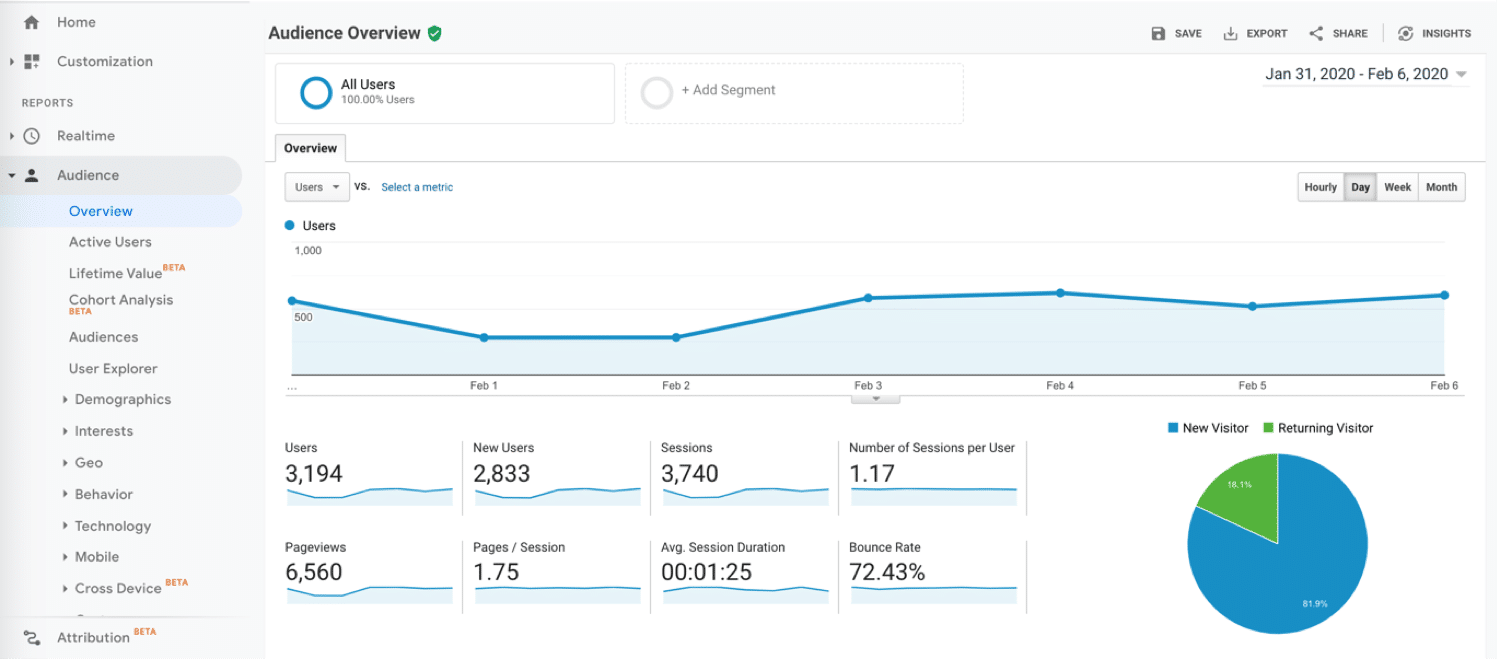 A Google Analytics dashboard
In addition to the above, it's free and takes minutes to set up with a Next.js project (if you follow this post 😉).
Adding Google Analytics to a Next.js project
Prerequisites
- A Next.js project hosted on a domain that can be used with Google Analytics preferably with at least one page. - Vercel (creators of Next.js) is the easiest place to host your website.
- A Google Analytics account with a created property and the ID (known as a
GA_MEASUREMENT_ID) that is given to you and is used to identify your website with Google. Keep theGA_MEASUREMENT_IDhandy, you'll need it. - I've covered this in the FAQs if you haven't used Google Analytics before.
Add/modify the _document.js file in your Next.js project
Create a custom _document.js file in your pages directory and add the following code:
If you're using TypeScript, check out this custom _document.tsx on GitHub instead.
import Document, {
  Html, Head, Main, NextScript,
} from 'next/document';

class MyDocument extends Document {
  static async getInitialProps(ctx) {
    const initialProps = await Document.getInitialProps(ctx);
    return { ...initialProps };
  }

  render() {
    const GA_MEASUREMENT_ID = 'GA_MEASUREMENT_ID'; // Paste your GTAG here
    return (
      <Html lang="en">
        <Head>
          <script
            async
            src={`https://www.googletagmanager.com/gtag/js?id=${GA_MEASUREMENT_ID}`}
          />
          <script
            // eslint-disable-next-line react/no-danger
            dangerouslySetInnerHTML={{
              __html: `
                window.dataLayer = window.dataLayer || [];
                function gtag(){dataLayer.push(arguments);}
                gtag('js', new Date());
                gtag('config', '${GA_MEASUREMENT_ID}', {
                  page_path: window.location.pathname,
                });
              `,
            }}
          />
        </Head>
        <body>
          <Main />
          <NextScript />
        </body>
      </Html>
    );
  }
}

export default MyDocument;
If you've already got a custom _document.js then the key parts are within the Head component (remember to add the GA_MEASUREMENT_ID variable):
<Head>
  <script
    async
    src={`https://www.googletagmanager.com/gtag/js?id=${GA_MEASUREMENT_ID}`}
  />
  <script
    // eslint-disable-next-line react/no-danger
    dangerouslySetInnerHTML={{
      __html: `
        window.dataLayer = window.dataLayer || [];
        function gtag(){dataLayer.push(arguments);}
        gtag('js', new Date());
        gtag('config', '${GA_MEASUREMENT_ID}', {
          page_path: window.location.pathname,
        });
      `,
    }}
  />
</Head>
Explanation:
- In the first
scripttag the Google Analytics JavaScript file is loaded into the browser. - In the second
scripttag the Google Analytics code is initialised and tracking is started on the current page.
Once you've added your GA_MEASUREMENT_ID and pushed your changes into a live environment such as Vercel, you should see data appearing on your Google Analytics dashboard - if you don't, try visiting your website!
And that is all it takes to add Google Analytics to your Next.js application - told you it was easy!
FAQs
What does the code above load onto my website?
The gtag.js is a script which allows you to send event data to Google, in this case it's used for Google Analytics. Read more about it and the GA_MEASUREMENT_ID at Google Developers - gtag.js.
What is a GA_MEASUREMENT_ID and how do I get one?
The GA_MEASUREMENT_ID is the ID of the Google Analytics property that you want to collect data for. To get a GA_MEASUREMENT_ID you need to create a new property on Google Analytics - you can follow this Google Support article to learn how to sign up to Google Analytics and create a property.
What are the _document.js and _app.js files in a Next.js project?
The Next.js specific _document.js and _app.js are two special files that live in the pages directory but are not rendered as pages by Next.js (you can't reach /_document in your browser).
Note: The Head component used in _document.js's Head different to next/head and should be used for common code on every page.
_document.js is rendered server-side only and controls the <html> and <body> tags of HTML. It can be used to add custom elements into your <html> tag that will be the same on every page such as the Google Analytics code or a favicon.
_app.js is rendered client-side, potentially on every page change. It's essentially a wrapper around each Next.js page that you have. It can be used to maintain a consistent layout on each page, add a custom CSS stylesheet or persist state on a page change.
You can read more about these on the Next.js website:
Why use the _document.js file over _app.js?
The Head component (from next/document) that is used in _document.js is rendered serverside whereas the Head component (from next/head) in _app.js will update on each page change meaning that the Google Analytics script may be reloaded which could slow down the site.
Round up
If anything I've said has helped you add Google Analytics to your site, give me a reaction.
Any more questions? Let me know in the comments!
Thanks for reading the article!
Comments
Join the discussionNo comments yet. Be the first to comment.


